Expo Router vs React
React Navigation vs Expo Router: Which Routing Solution is Better for Modern React Native Apps?

Introduction
When most of the new developers start learning React Native, the first very confusing topic they face is navigation. At first, building screens feels simple like Home Screen, Login Screen, Profile Screen but the real question is how do users move between these screens.
That is where routing and navigation come into the picture. In today's mobile applications, navigation is one of the most important architectural decisions because it affects:
App Structure
Code organization
Developer experience
Authentication flows
For years , React Native developers mainly used React Navigation. Today's a newer approach called Expo Router is becoming popular.
What routing means in mobile applications
In Web Development, routing means moving between pages using URLs. For example : /about , /profile , /login, /home . Mobile apps do not usually show URLs like website, but the idea is similar. Routing in mobile apps means Moving between screens while maintaining app state and user experience. For example :
User opens Login Screen
After login -> moves to Dashboard
Opens Profile section
Goes back to Dashboard
Opens Home Page
All this movement between screens is called navigation or routing.
Why navigation is important in React Native apps
Navigation is important in React Native apps because without navigation, every screen would be isolated. Imagine a banking app without proper navigation:
No back button
No stack history
No tab navigation
No authentication flow
No deep linking
This makes a User Experience worst and most importantly the app would become unusable. To overcome this Navigation is needed. In simple words we can say that Navigation is the backbone of app flow. Let's see a bird view what does Navigation handles :
Screen transitions
Back behavior
Navigation history
Passing data between screens
Nested screens
Authentication routing
Tabs and drawers
Deep linking
Brief history of React Navigation
React Navigation was introduced around 2017 and became the most popular navigation library for React Native. It solved major problems like : cross platforms support, flexible navigation patterns, stack navigation, bottom tabs, drawer navigation, deep linking and Custom transitions. Over the time , React Navigation became extremely powerful. But there was a problem with React Navigation.
Problems developers faced with traditional navigation setup
Although React Navigation was powerful, it also introduced a lot of manual work which is good for developers which gives fully control to developers but it makes the Developers Experience little difficult. A simple could become messy quickly. For example:
<Stack.Navigator>
  <Stack.Screen name="Home" component={HomeScreen} />
  <Stack.Screen name="Profile" component={ProfileScreen} />
  <Stack.Screen name="Settings" component={SettingsScreen} />
</Stack.Navigator>
This code seems fine initially but in larger apps : Hundreds of screens, nested stacks, authentication stacks, admin dashboard , role - based navigation and many more. Things became very difficult. Developers faced problems like :
Too much Boilerplate
Navigation logic became Huge
Folder structure was not clear
Nested Navigation Became Complex
Mental Overhead for Beginners
Why Expo Router was introduced
To solve the above problems, the Expo team introduced : EXPO ROUTER . Expo Router is built on top of React Navigation. This is very important concept to keep mind. Expo Router does not replace Navigation internally. It actually uses React Navigation underneath. Expo Router mainly changes :
Developer workflow
Folder structure
Routing mental model
Expo Router biggest idea or concept is File-Based Routing.
File-based routing explained simply
Instead of manually registering screens, your folders become routes automatically. This gives edge to Expo Router. For example :
app/
 |-- index.jsx
 |-- profile.jsx
 |-- settings.jsx
It automatically becomes /profile , /settings . You no longer manually define routes. The file system itself becomes the navigation system. This approach is inspired by frameworks like Next.js . Web Developer immediately feel comfortable with it.
Traditional React Navigation vs Expo Router
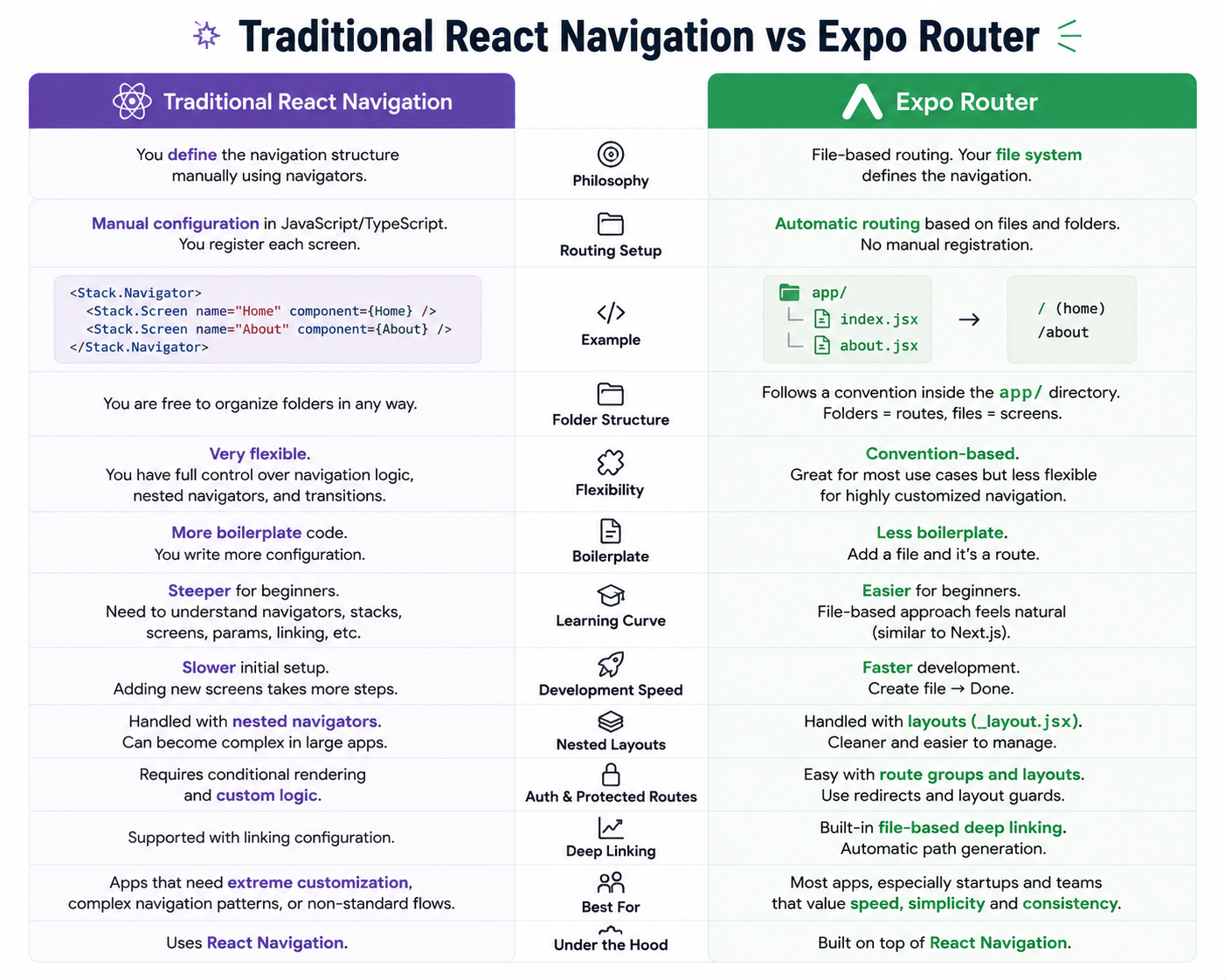
Nested layouts and shared layouts in Expo Router
Nested layouts
One of the Expo Router strongest features is layouts. You can create shared UI structures easily. For example :
app/
 |-- _layout.jsx
 |--dashboard/
 |        |--_layout.jsx
 |        |-- index.jsx
 |        |--analytics.jsx
 |        |--settings.jsx
Here _layout.jsx controls app-wide navigation and Dashboard _layout.jsx controls dashboard-specific navigation. This makes the nested navigation much easier.
Shared layouts
Imagine you are making an admin dashboard. Every screen needs a sidebar, Header and bottom tabs. Instead of repeating them everywhere, layouts share UI automatically. This improves :
code reusable
maintainability
consistency
Protected routes and authentication flows

Performance comparison
Bundle behavior
React Navigation
Developers manually control navigation structure. This can allow very optimized setups in experienced hands.
Expo Router
Expo Router generates routes from files automatically. Modern bundlers handle this efficiently. For most apps Performance difference is very small. In real-world production apps, user experience matters more than tiny benchmark differences.
Navigation transitions
Since Expo Router uses React Navigation internally : - Stack animations are similar, Gestures are similar and Transitions performance is similar. Because underneath the share the same navigation engine.
Developer workflow
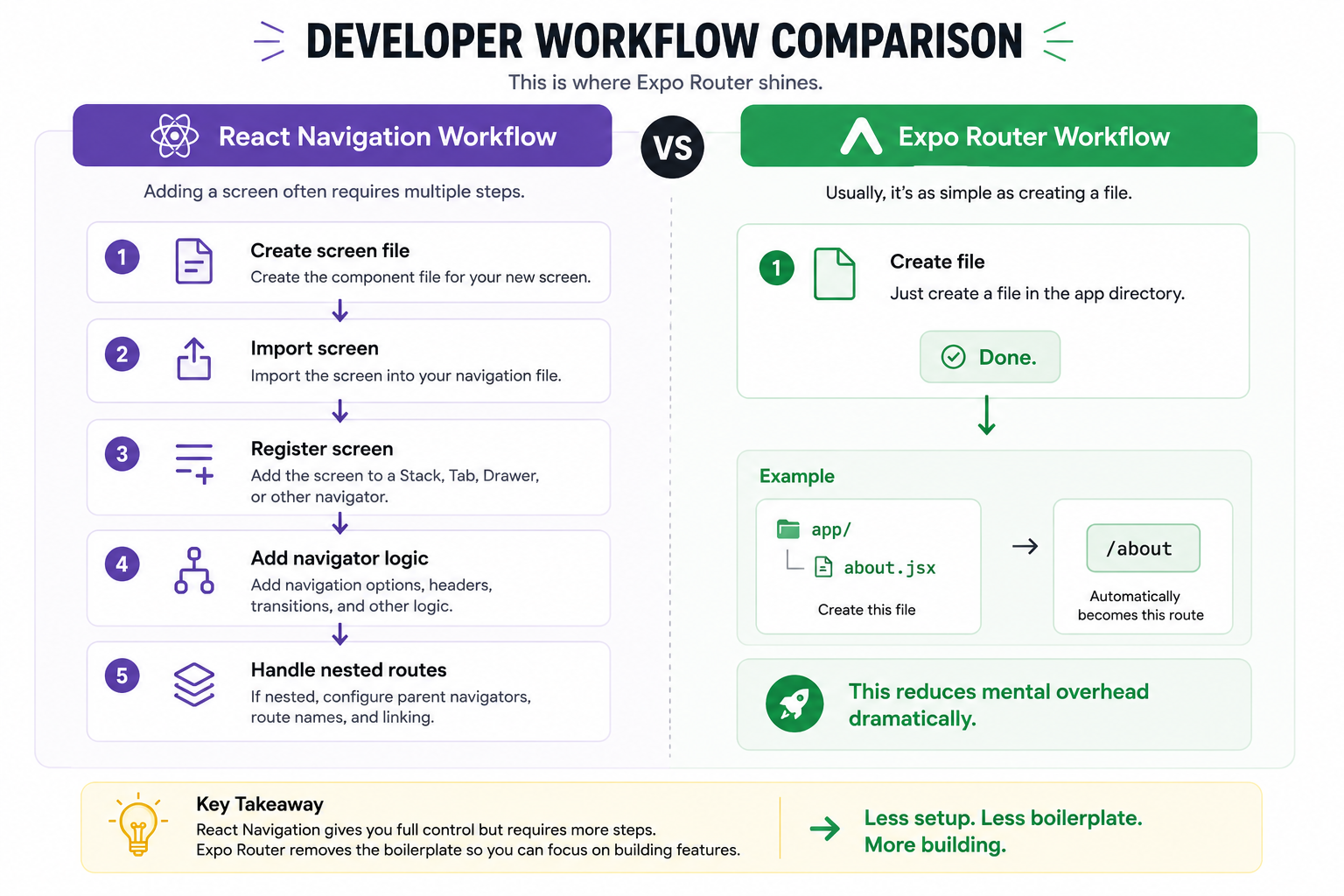
Developer Experience (DX) comparison
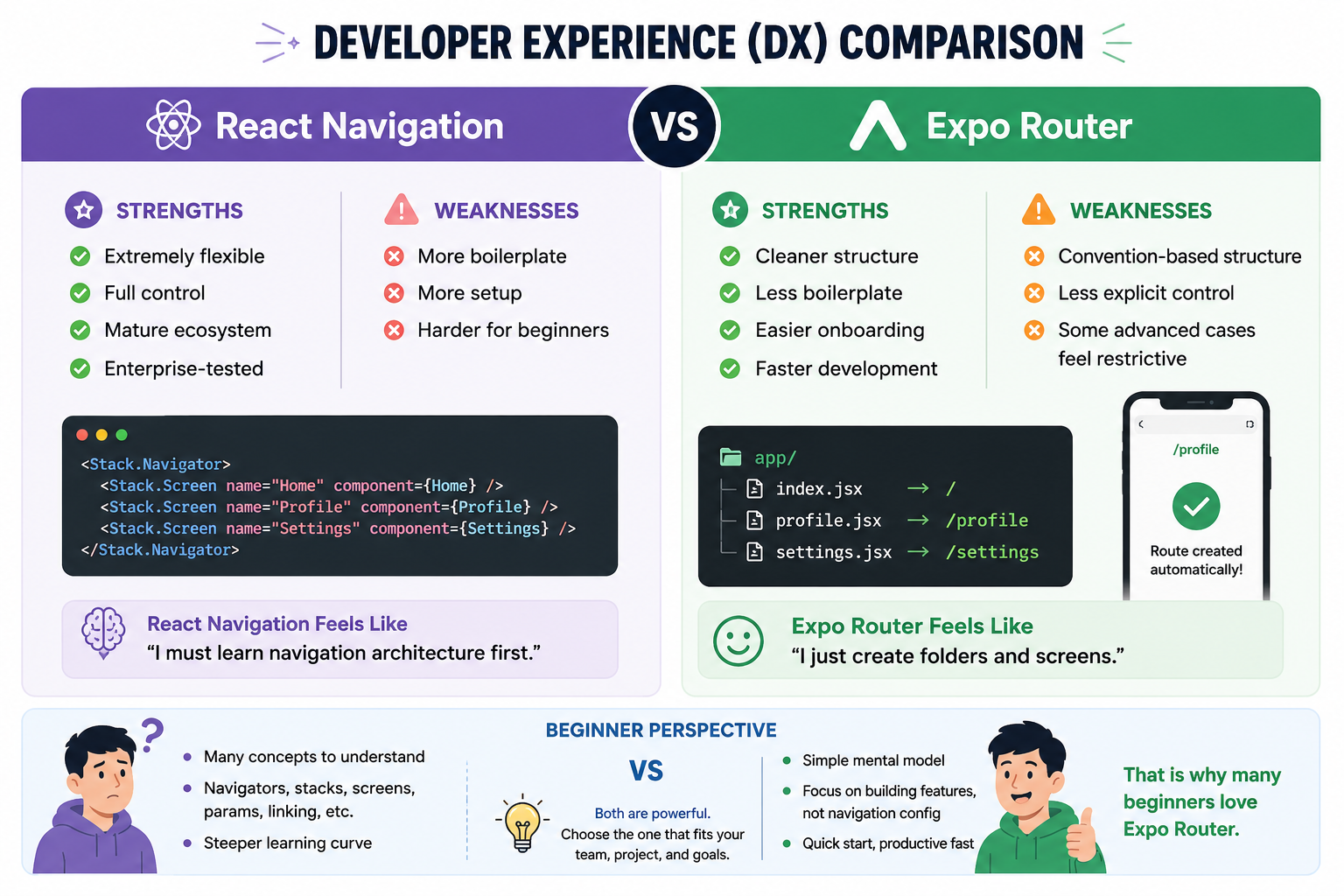
Real-world app folder structure examples
Let's understand the real-world folder structure by an example of a Social Media App :
app/
 ├── (auth)/
 │    ├── login.jsx
 │    └── register.jsx
 │
 ├── (tabs)/
 │    ├── home.jsx
 │    ├── search.jsx
 │    ├── reels.jsx
 │    └── profile.jsx
 │
 ├── post/
 │    └── [id].jsx
Which approach companies and teams prefer
Currently :
Many older React Native apps still use React Navigation directly
New Expo-based aps increasingly use Expo Router
Startups often prefer Expo Router because:
Faster development
Cleaner structure
Better onboarding
Large enterprises may still prefer React Navigation because:
Existing codebases
Advanced customization
Long term internal architecture decisions
When NOT to use Expo Router
Expo Router is not automatically the best choice for everything. Avoid it when :
1. Extremely Custom Navigation Logic
If your app has Complex native integrations, Highly customized transitions and advanced dynamic navigator generation. React Navigation may give more control.
2. Existing Large React Navigation Project
Migrating huge apps may not be worth the effort. Instead it will work better with React Navigation.
3. Heavy Non-Expo Ecosystem Requirements
Some bare React Native setups may integrate better directly with React Navigation.
Situations where React Navigation still makes more sense
React Navigation is still excellent for enterprise legacy apps, highly customized navigation, Advanced nested patterns, Native-heavy applications and teams already experienced with it.
Remember:
Expo Router still depends on React Navigation internally.
So learning React Navigation concepts remains valuable.
Wrapping Up👋
Thanks for reading till the end 🙌
I hope this article helped you understand the topic in a simple, practical, and beginner-friendly way.
My goal is to break down complex tech concepts into clear, real-world explanations, especially for learners who are just starting out or feeling overwhelmed.
If you found this useful, feel free to bookmark, share, or leave a comment - it really helps and keeps me motivated to write more.
You can connect with me here:
💼 LinkedIn
Let’s learn together and grow step by step 🚀


