How a Browsers Works: A Beginner-Friendly Guide to Browser Internals
More Than Just a Window: Understanding the Mini-Operating System Inside Your Browser
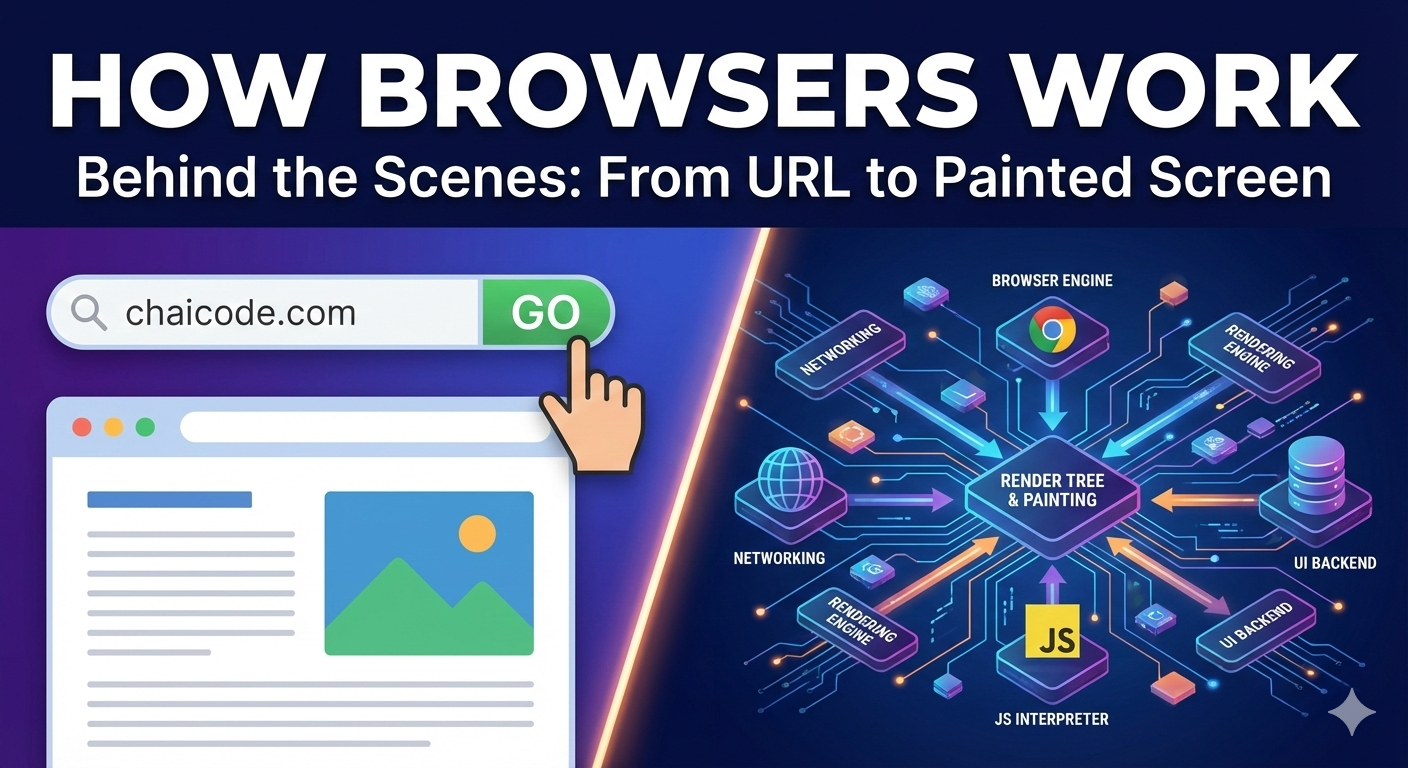
A simple and easy question I want to ask: What really happens after you type a URL in the browser and press ENTER or search.
What a Browser actually is (beyond “it opens websites”)
A Browser is not just an app that only “opens websites”. It is a mini operating system for the web. The Browser talks to servers, understand conventional and unconventional web parsing, calculates layouts, paints and finally shows you a website that you use it. All of this happens in milliseconds.
A browser is a coordinator. It connects many internal components and make them work together smoothly. Let’s understand this with an example: think of it like a railway station, trains(like data) arrive, signals decide where train should go, platforms organize them and passengers (content) finally reach you in an orderly way. The browser’s job is to fetch web data, understand it and convert it into something you can see and interact with.
Main parts of a Browser
The main parts of a browser has a :
User Interface ( UI )
Browser Engine
Rendering Engine
Networking layer
JS Interpreter
UI Backend
At high level you don’t need to remember names, just understand that the browser works like a team not a single block.
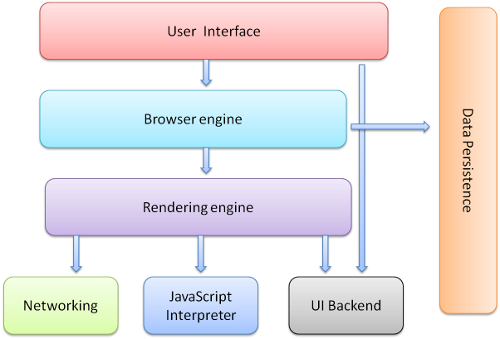
User Interface: address bar, tabs, buttons
The User Interface (UI) is the part you directly interact with the address bar, backward or forward buttons, refresh button, bookmarks and tabs. Think of like the dashboard of a car - it does not move the car by itself but it let’s you control direction and speed. When you type a URL here in the browser, the real works starts behind the scenes.
The browser UI is like the steering wheel and pedals of a Car. You control direction and speed but engine, gears and wheels do the real work under the hood. Once you understand this, it becomes clear why clicking a button or typing in the address bar can trigger such a large and complex process inside the browser.
Browser Engine vs Rendering Engine
The Browser Engine acts as a manager. It connects the UI with the lower-level engines and decides what should happen next.
The Rendering Engine is the artist. It’s job is to take HTML and CSS and convert them into visual content on the screen.
In simple words, the browser engine gives instructions and the rendering engine draws the page.
Networking: how a browser fetches HTML, CSS and JS
Once you type chaicode.com and then click search on the browser, the browser’s networking layer contact the server and requests data. The network first do the TCP 3-way handshake before fetches data. Then it fetches HTML first, then CSS file, JavaScript files, images and fonts. This is similar to ordering food online, first you place the order (the request), then items arrive one by one, not always together.
HTML parsing and DOM creation
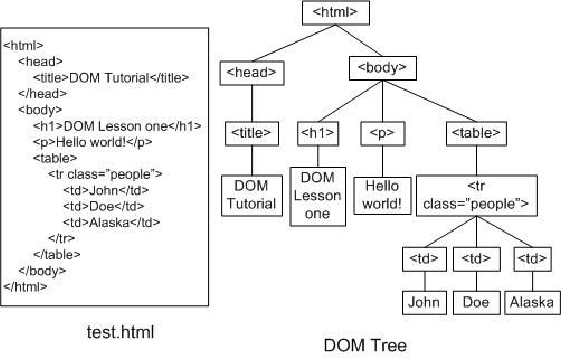
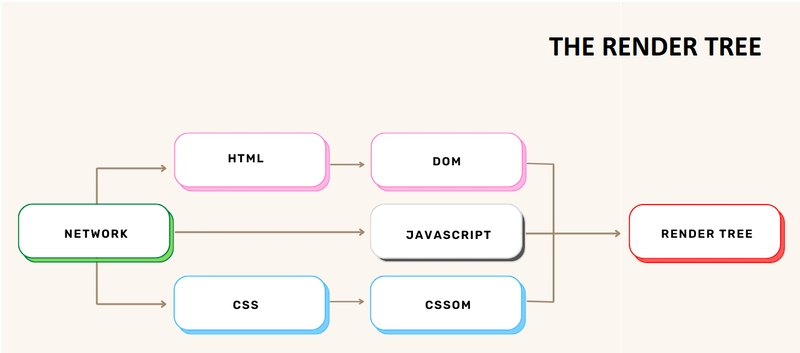
When HTML arrives, the browser does not display it directly. It parses in non-conventional way - meaning it reads the HTML line by line and understands its structure. From this, it creates the DOM.
The DOM (Document Object Model) is like a family tree, where <html> is the root , <body> is a branch and elements like <div>, <p> and <button> are children and grandchildren.
CSS parsing and CSSOM creation
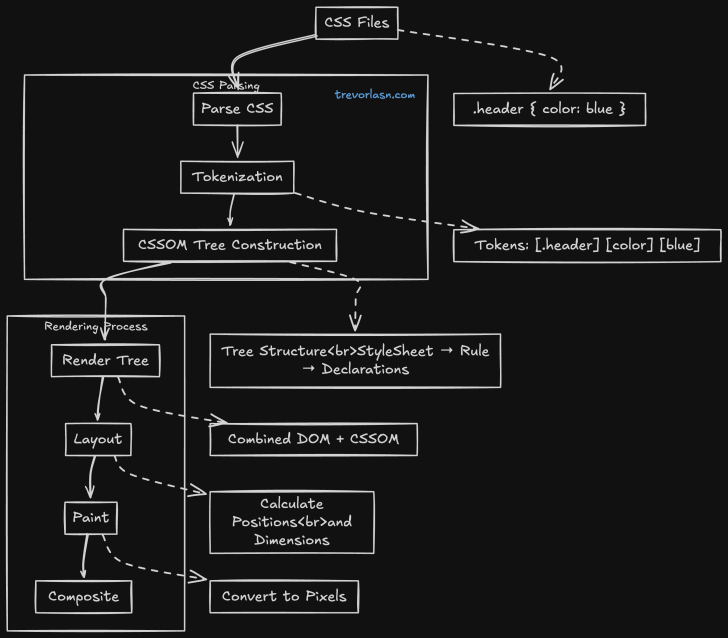
CSS parsing means the browser reads the CSS rule by rule and breaks into parts. When a browser receives CSS, it does not immediately apply styles to the page. Just like HTML, CSS must be parsed in conventional web parse- meaning the browser reads and understand it. It tries to understand what element should look like what.
The CSSOM (CSS Object Model) is a tree like structure created after CSS parsing. It represents all the CSS rules in an organized form that the browser can quickly apply to elements. You can understand or remember CSSOM as a style rule book, neatly arranged so the browser can find the correct styles without confusion
How DOM and CSSOM come together
The browser combines DOM and CSSOM to form the Render Tree. The render tree contains only the elements that are actually visible and includes their styles. The Render Tree is the final arrangement of elements and styles to be displayed on the screen. One thing to remember that elements like display: none are skipped.
Layout (reflow), painting and display
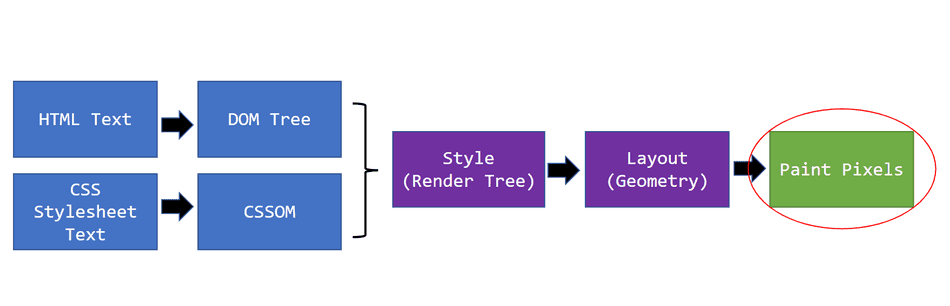
Layout is also called reflow. The browser calculates where each element should appear - like its width, height and position of the element.
After layout, the browser paints the pixels(colors, borders, text). Finally , everything is displayed on the screen.
This is like a building a house, first plans rooms (layout), then paints walls (painting) and finally hand over the keys (displays).
What is parsing
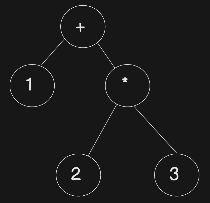
Parsing simply means breaking something into meaningful parts so that it can be understood properly. When a browser, computer or even a human sees raw text, it first needs to understand the structure and meaning of that text. Parsing is the step where this understanding happens. Parsing turns into something organized and meaningful. Example : 1 + 2 × 3
Summary
A browser is not just a tool to open websites - it is a complete system that takes web content and turns it into something you can see and use. When you type a URL and press Enter, the browser starts by fetching data from the internet. The User Interface takes your input, the networking layer brings HTML, CSS and JavaScript and the internal engines begin their work.
HTML is parsed and converted into the DOM, which represents the structure of the page like a tree. CSS is parsed separately into the CSSOM, which defines how that structure should look. These two models are then combined to create the Render Tree, which contains only visible elements with their final styles. From there, the browser calculates layout, paints pixels, and finally displays the page on your screen.
📌 Wrapping Up
Thanks for reading till the end 🙌
I hope this article helped you understand the topic in a simple, practical, and beginner-friendly way.
My goal is to break down complex tech concepts into clear, real-world explanations, especially for learners who are just starting out or feeling overwhelmed.
If you found this useful, feel free to bookmark, share, or leave a comment - it really helps and keeps me motivated to write more.
You can connect with me here:
💼 LinkedIn
Let’s learn together and grow step by step 🚀


