JavaScript Modules: Import and Export Explained

As a developer you also has come across multiple time when your applications grow bigger, managing all code inside a single file becomes very difficult. Imagine writing functions, variables, API calls, auth logic, UI logic all inside a single file. The code becomes messy, difficult to read, hard to maintain and confusing for teams , to solve this problem, JavaScript introduced : Modules.
Modules help developers split code into smaller , reusable and organized files.
The problems Before Modules
Earlier, many developers used to large JavaScript files like this :
function login() {}

function logout() {}

function fetchUsers() {}

function calculatePrice() {}

function generateInvoice() {}
As applications became larger : files became huge , debugging became difficult, naming conflicts happened , teamwork became confusing and many difficulties. Managing everything in one place was not practical.
Why modules are needed
Modules are needed because Modules solve code organization problems. Instead of writing everything in one file, we can divide code into multiple smaller files based on functionality. Example :
auth.js
api.js
utils.js
cart.js
payment.js
Each file handles it's own responsibility. This makes applications cleaner, scalable, easier to maintain, easier to debug, easier for teams to work on.
What is a Module?
A module is simply a JavaScript file with reusable code. A module can contain functions, variables, objects and classes that can be shared with other files.
Exporting functions or values
To use code from one file inside another file, we first need to export it. JavaScript provides the export keyword. For example:
export const add = (a, b) => {
  return a + b;
};

export const subtract = (a, b) => {
  return a - b;
};
Here export makes these functions available outside the file.
Importing modules
Once export file process is done we can use these function in another file using import keyword. For example:
app.js
import { add, subtract } from "./math.js";

console.log(add(10, 5));
console.log(subtract(10, 5));
Output:
15
5
This is how modules communicate with each other.
Understanding the flow
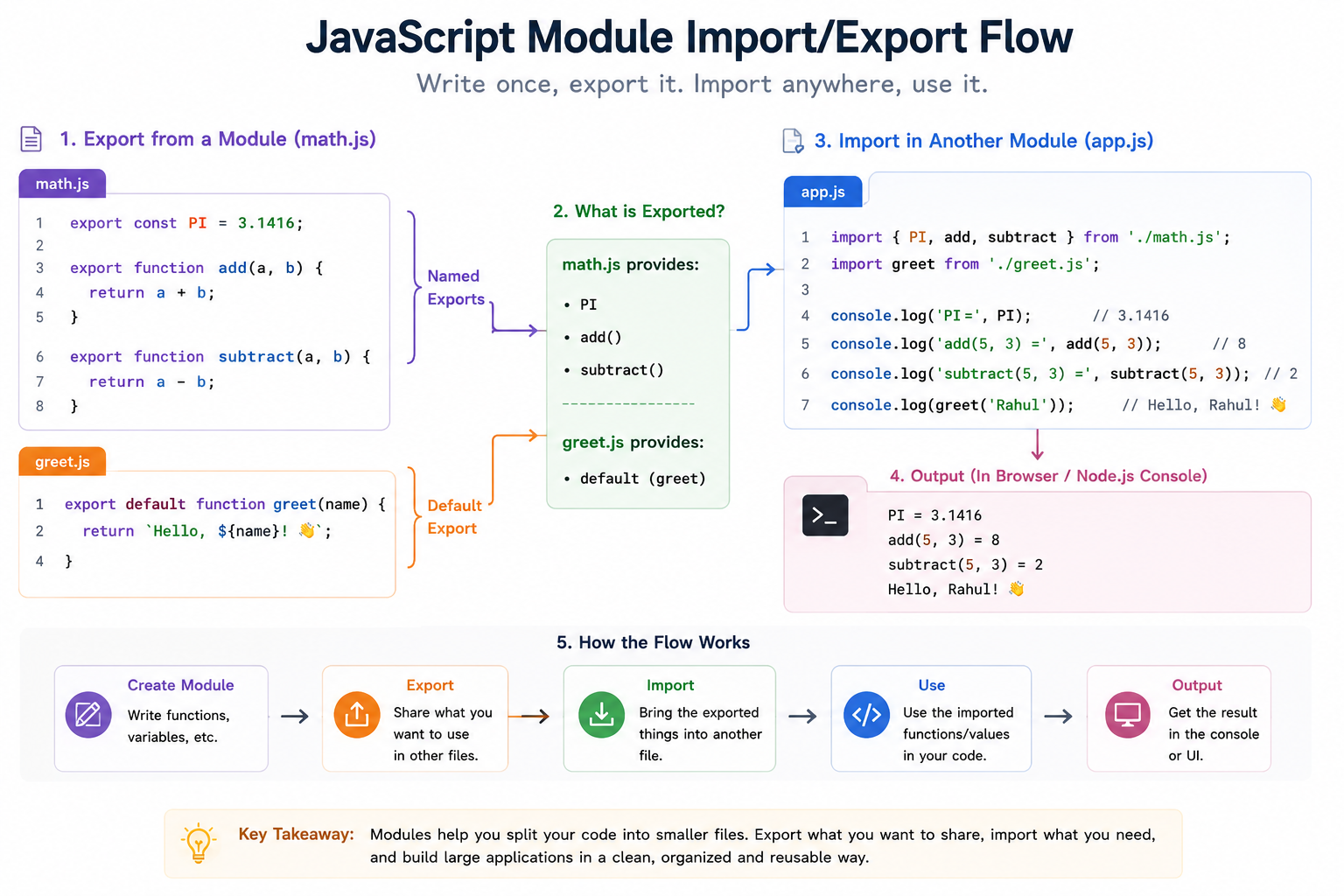
Default vs named exports
Named Exports
In above example :
export const add
export const subtract
These functions are called Named Exports because each export has its own name. While importing we need to keep in mind to import it with proper names , that names should match exactly with export name. For example :
import { add, subtract } from "./math.js";
Default Export
JavaScript also provides default export, a file can have only one default export. Example of default export :
greet.js
export default function greet() {
  console.log("Hello User");
}
Importing:
app.js
import greet from "./greet.js";

greet();
OUTPUT:
Hello User
Difference between Named and Default Export
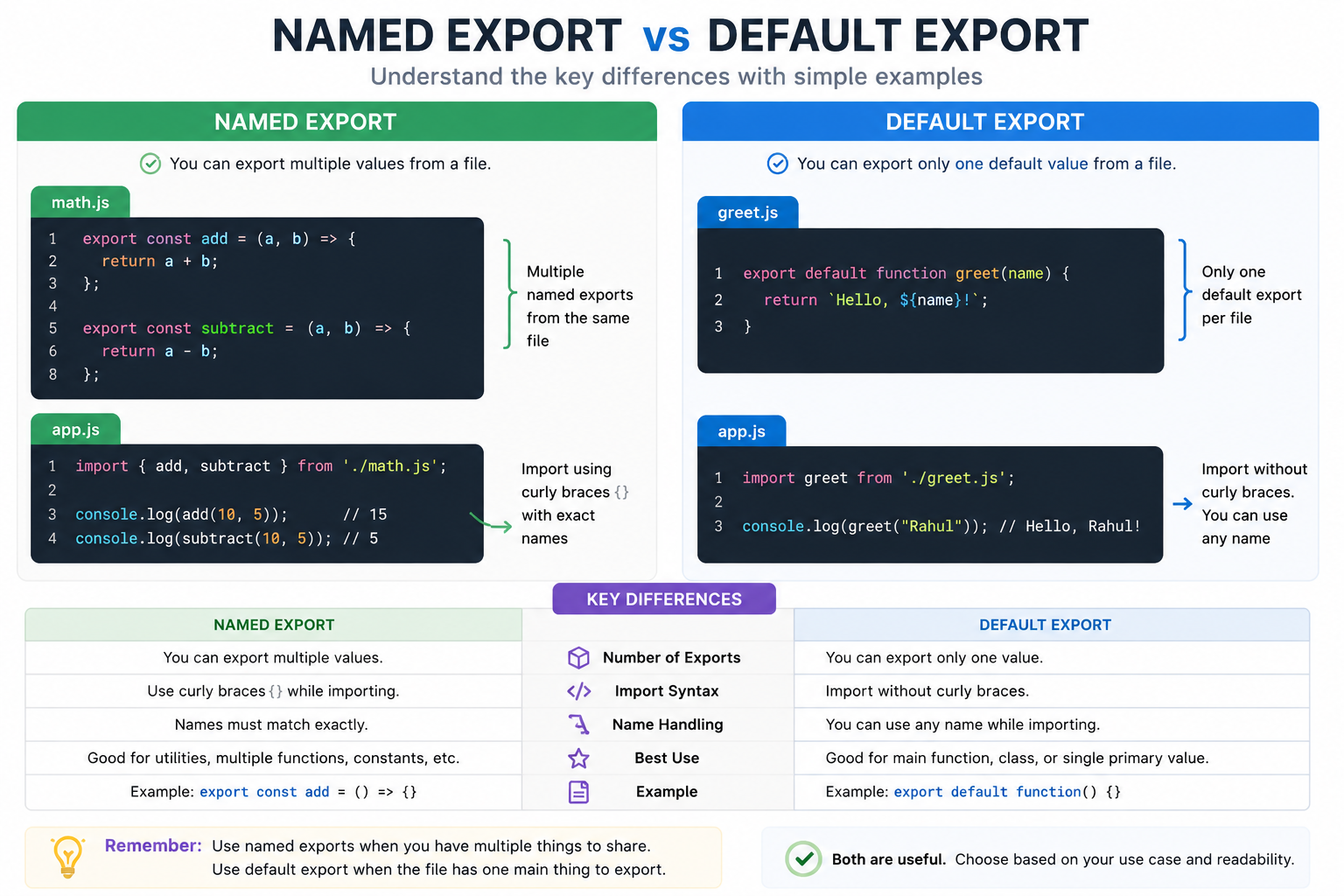
Benefit of modular code
Modules are extremely important in modern day to day JavaScript development.
1. Better Code Organization
2. Easier Maintenance
3. Reusability
4. Easier Team collaboration
5. Scalability
6. Cleaner and Readable Code
Modern JavaScript Uses Modules everywhere. Modules are heavily used in React, Node.js, Express, Next.js , Vue, Angular and Express. Almost every modern JavaScript project uses modular architecture.
Wrapping Up
Thanks for reading till the end 🙌
I hope this article helped you understand the topic in a simple, practical, and beginner-friendly way.
My goal is to break down complex tech concepts into clear, real-world explanations, especially for learners who are just starting out or feeling overwhelmed.
If you found this useful, feel free to bookmark, share, or leave a comment - it really helps and keeps me motivated to write more.
You can connect with me here:
💼 LinkedIn
Let’s learn together and grow step by step 🚀


