Spread vs Rest Operators in JavaScript
Expanding vs. Collecting: Mastering the Modern JavaScript Three-Dot Syntax

The spread and rest operators are among the most powerful features introduced in modern JavaScript (ES6). At first , many beginners get confused including me because of this ... is used for both spread and rest operators. Same symbol different behavior, but once you understand one simple idea, everything becomes easy. I remember this way :
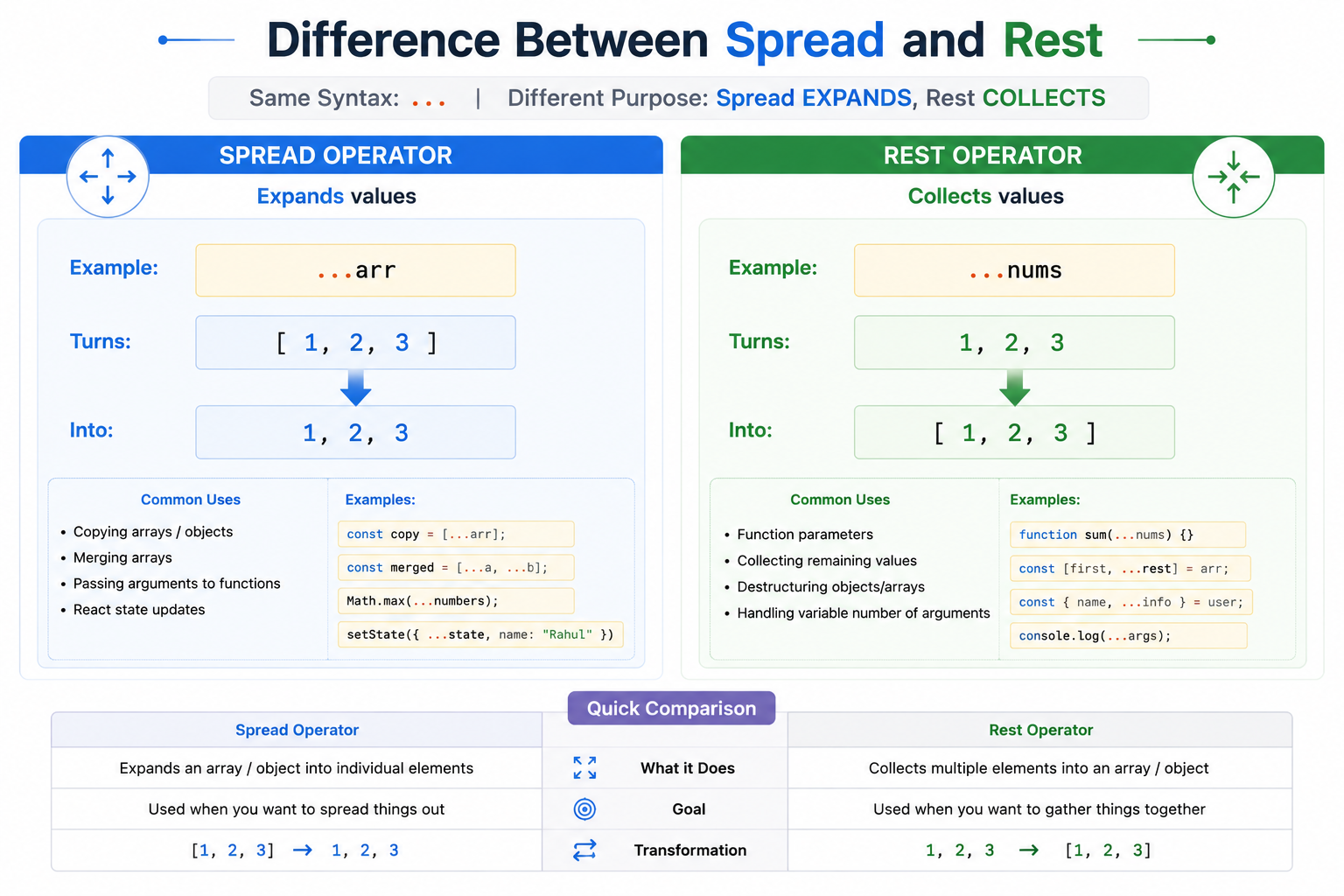
Spread -> Expands Values
Rest -> Collects values
What spread operator does
The spread operator is used to Expand values . It takes elements from an array or object and spreads them individually. Syntax is : ...
Example :
const arr = [1, 2, 3];

console.log(...arr); //OUTPUT : 1 2 3
Normally arr is [1,2,3,] but ...arr expands it into individual values. This is why it is called Spread operator. It spreads values outward.
Copying Arrays Using Spread
const original = [1, 2, 3];

const copy = [...original];

console.log(copy);
Output:
[1, 2, 3]
This creates a new copied array.
Using Spread with Objects
Spread also works with objects
const user = {
  name: "Rahul",
  age: 21
};

const updatedUser = {
  ...user,
  city: "Delhi"
};

console.log(updatedUser);
Output:
{
  name: "Rahul",
  age: 21,
  city: "Delhi"
}
What rest operator does
Now let's understand rest operator. Rest operator is used to collect multiple values into one structure. Same syntax ... but behavior is opposite of spread.
Example
function sum(...numbers) {
  console.log(numbers);
}

sum(1, 2, 3, 4);
Output:
[1, 2, 3, 4]
Rest Operator with Function Parameters
function greet(first, ...others) {
  console.log(first);
  console.log(others);
}

greet("Rahul", "Amit", "Priya");
output:
Rahul
["Amit", "Priya"]
Rest Operator with Objects
const user = {
  name: "Rahul",
  age: 21,
  city: "Delhi"
};

const { name, ...rest } = user;

console.log(name);
console.log(rest);
Output:
Rahul

{
  age: 21,
  city: "Delhi"
}
Here , ...rest collects remaining properties.
Differences between spread and rest
Practical use cases
1. React State Updates
setUser({
  ...user,
  age: 22
});
2. Array Merging
const all = [...arr1, ...arr2];
3. Copying Objects
const all = [...arr1, ...arr2];
4. Flexible Function Parameters
function total(...nums) {}
Important
Do not try to memorize syntax blindly instead always ask Is this operator expanding or collecting data. That immediately tells whether it is spread or rest.
Wrapping Up 📍
Thanks for reading till the end 🙌
I hope this article helped you understand the topic in a simple, practical, and beginner-friendly way.
My goal is to break down complex tech concepts into clear, real-world explanations, especially for learners who are just starting out or feeling overwhelmed.
If you found this useful, feel free to bookmark, share, or leave a comment - it really helps and keeps me motivated to write more.
You can connect with me here:
💼 LinkedIn
Let’s learn together and grow step by step 🚀


