TCP Working: 3-Way Handshake & Reliable Communication
Beyond the Messy Network: A Beginner’s Guide to the 3-Way Handshake and Reliability
What is TCP and why it is needed
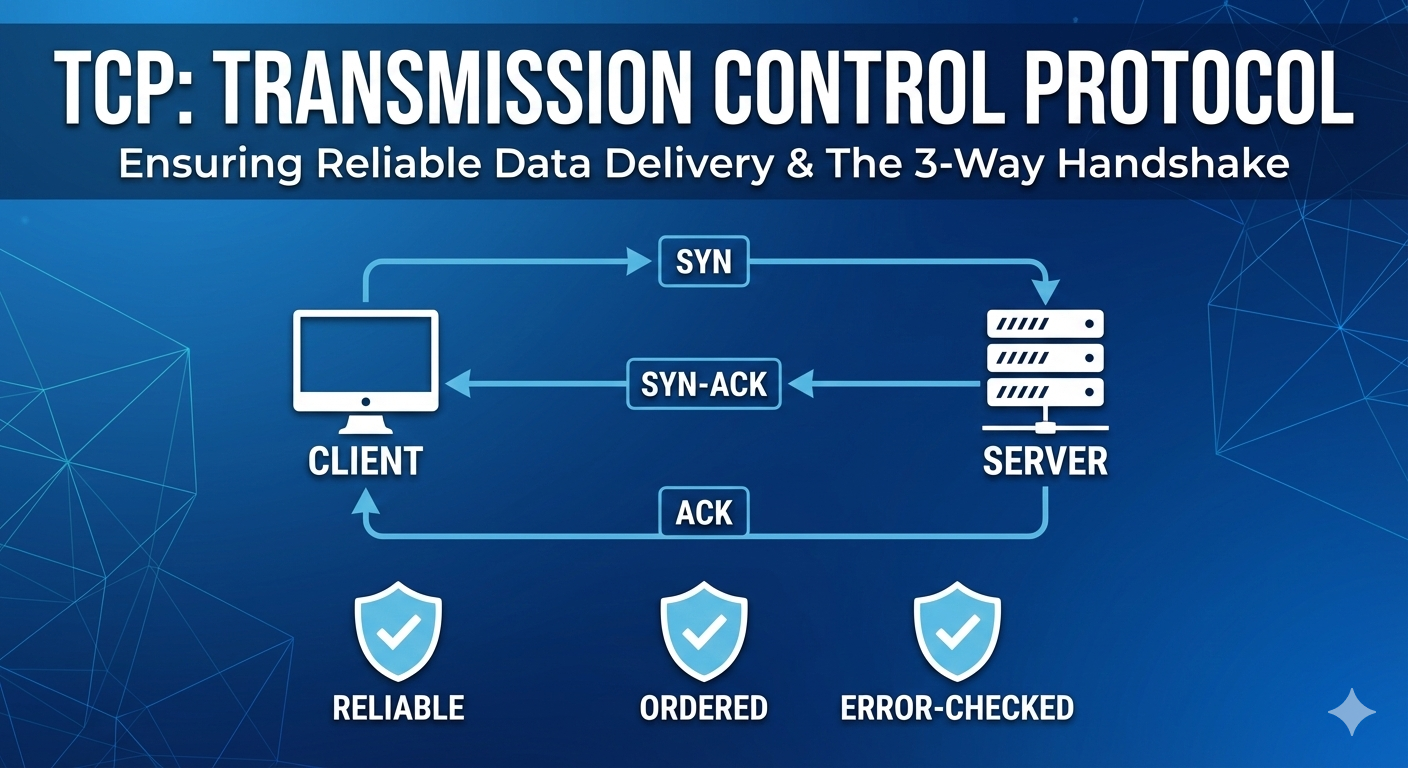
TCP stands for Transmission Control Protocol . TCP is one of the core communication rules of the internet. Let’s take an example you are having a phone conversation with a friend. You make sure they hear everything you say, in the right order and without any words getting lost. Whenever you open a website, send an email or upload a file, TCP usually works in the background to make sure data reaches the destination correctly and completely. The internet itself is unreliable - data travels through many routers and network - so TCP is needed to handle mistakes, losses and ordering issues. Without TCP, applications would receive broken or incomplete data and would not work reliably.
TCP is needed because sending data over internet was unreliable. Data may have packet loss, out of delivery , flow control and congestion control.
Problems TCP is designed to solve
TCP exists because data sent over the internet can face may problems like data packet loss, out of delivery and many more problems. TCP is designed to solve all these issues by tracking every piece of data, resending lost packets, arranging them in the correct order and adjusting the sending speed when the sending speed when the network is busy. In Simple word, TCP adds intelligence and safety on the top of a messy network.
What is the TCP 3-way Handshake
Before any data can be sent, TCP establishes a connection using a process called the “3-way handshake”. Think of two people a teacher and a student having a class over an internet and teacher ask a question and student unmute himself and first say “sir am i audible” and then teacher reply “yes you are “. This is the 3-way handshake is done and now they can proceed. Only after this handshake is complete does actual data start flowing.
Step-by-step working of SYN, SYN-ACK and ACK
Step 1 : SYN (Synchronize)
Your computer (client) wants to connect to server
It sends a special packet called “SYN”
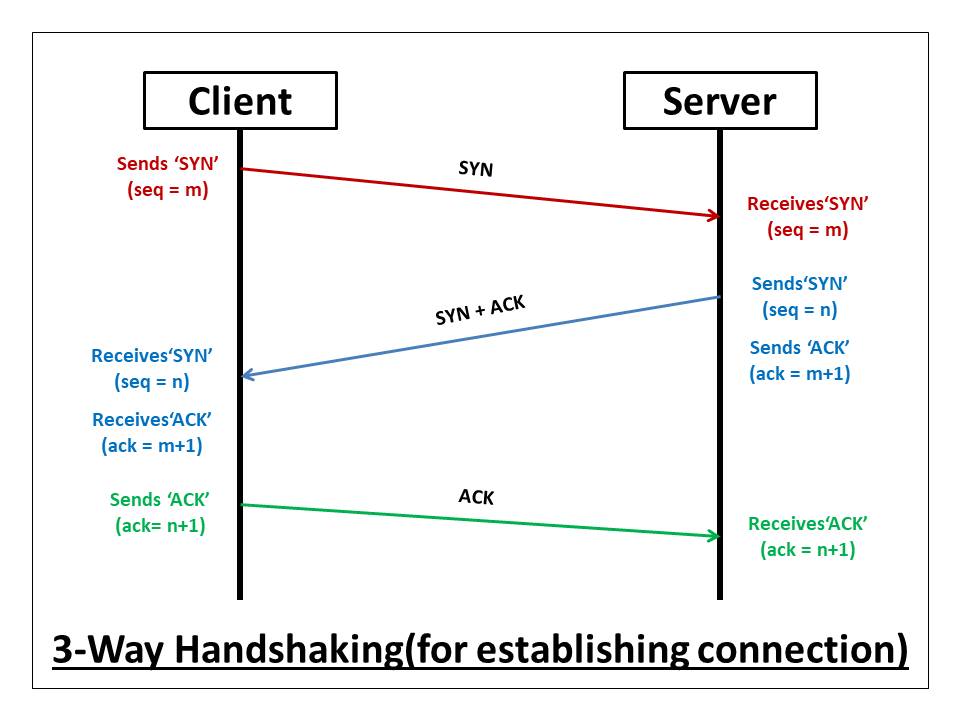
This packet says: “Hey, I want to talk to you! Here my starting sequence number”
The sequence number is like a page number that helps keep track of data.
Step 2 : SYN-ACK (Synchronize-Acknowledge)
The server receives the SYN packet
If it’s willing to connect, it sends back a “SYN-ACK” packet
This packet says: “I got your message! I’m ready to talk. Here’s my Starting sequence number and I acknowledge yours”.
Step 3: ACK (Acknowledge)
Your computer receives the SYN-ACK
It sends back an “ACK” packet
This packet says: “Great ! I acknowledge your sequence number. Let’s start communicating”.
At this point, the connection is established and data transfer can begin
How data transfer works in TCP
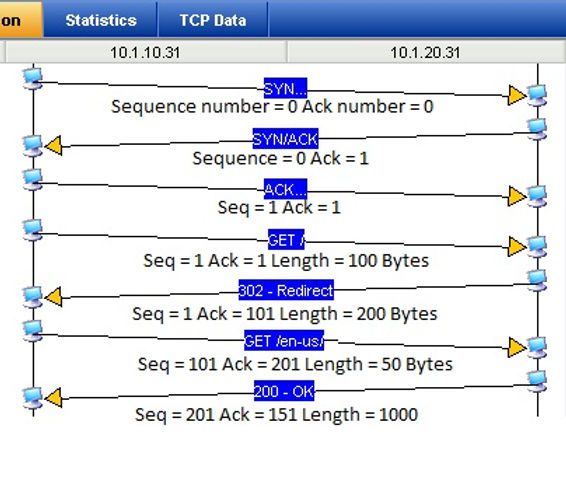
Once the connection is established after having 3-way handshake, TCP breaks large data into small packets and sends them one by one. Each packet has a sequence number, so the receiver knows the exact order. The receiver sends back acknowledgements to confirm which packets were received. If a packet is missing, the sender sends it again. This process continues until all data is delivered successfully.
How TCP ensures reliability, order and correctness
TCP ensures reliability by resending lost packets. It ensures order using a sequence numbers so data is reassembled correctly. It ensures correctness using checksums, which detects corrupted data. TCP also uses flow control to avoid overwhelming the receiver and congestion control to avoid overloading the network. Because of all this, applications receives clean, complete and properly ordered data.
How a TCP connection is closed
When communication is done TCP gracefully closes the connection using a 4-way process (sometimes called a “4-way handshake”):
Step 1 : Finish from Client
The clients sends a FIN (finish) packet
This says : “I’m done sending data”.
Step 2: ACK from server
The server acknowledge the FIN
This says: “I understand you are done”.
The server can still send data if it needs to
Step 3 : FIN from server
When the server is also done, it sends it own FIN
This says: “I’ m done too”
Step 4: ACK from client
The client acknowledge the server’s FIN
This says: “Got it, goodbye!”
The connection is now fully closed.
TCP connections are “full-duplex”, meaning data flows both ways independently. Each side needs to close its end of the connection separately. It’s like ending a phone call where both people say goodbye.
Summary
TCP is the unsung hero of the internet, working behind the scenes to ensure your emails, web pages, file downloads, and video streams arrive perfectly. Here's what makes it special:
Reliable: Guarantees data delivery through acknowledgments and retransmissions
Ordered: Ensures data arrives in the correct sequence
Error-checked: Detects and corrects corrupted data
Flow-controlled: Prevents overwhelming the receiver
Congestion-aware: Adapts to network conditions
The next time you stream a video, download a file, or load a web page, remember that TCP is working tirelessly to make sure every single bit of data arrives exactly as it should. It's a perfect example of how complex systems work seamlessly in the background to create the smooth internet experience we often take for granted.
📌 Wrapping Up
Thanks for reading till the end 🙌
I hope this article helped you understand the topic in a simple, practical, and beginner-friendly way.
My goal is to break down complex tech concepts into clear, real-world explanations, especially for learners who are just starting out or feeling overwhelmed.
If you found this useful, feel free to bookmark, share, or leave a comment — it really helps and keeps me motivated to write more.
You can connect with me here:
💼 LinkedIn
Let’s learn together and grow step by step 🚀


